
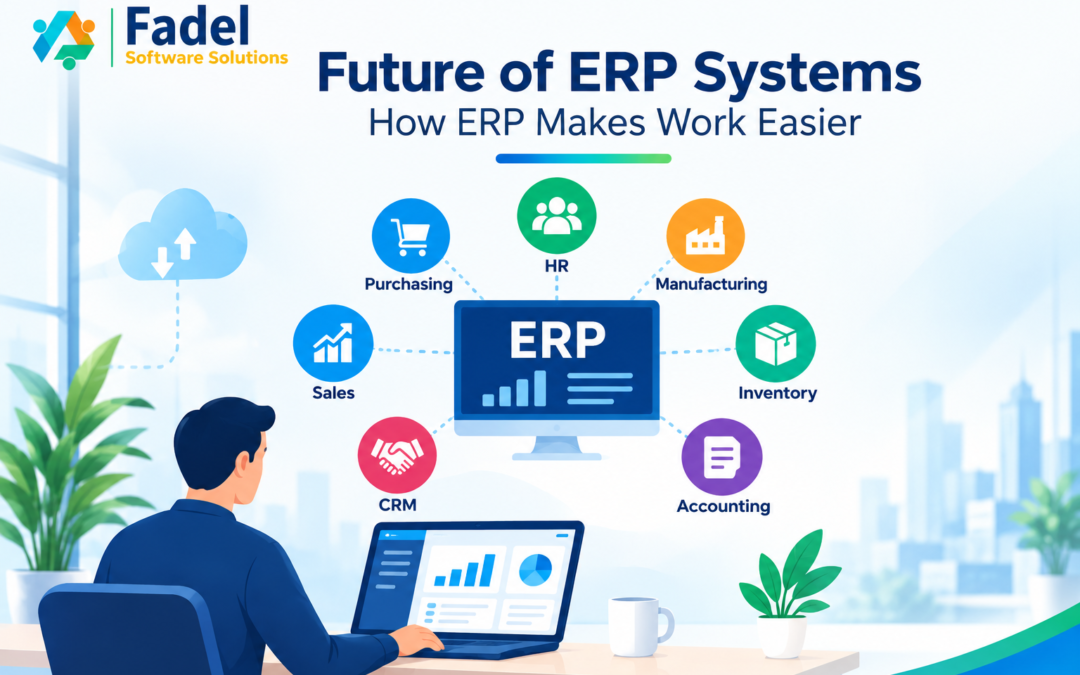
Future of ERP Systems: How ERP Makes Work Easier
Have you ever wondered how much time your business could save if all your daily operations were managed in one place? From sales and accounting to inventory and customer management, businesses handle many activities every day. When these processes rely on separate tools, spreadsheets, emails, and manual paperwork, work can become complicated and time-consuming.
This is where the future of ERP systems becomes important.
Enterprise Resource Planning (ERP) systems help businesses connect their departments, organize information, automate repetitive tasks, and improve visibility across operations. With developments in artificial intelligence (AI), cloud computing, and business automation, ERP software is becoming more capable of supporting modern business needs.
In this blog, we will explore how future ERP systems can make work easier, improve productivity, reduce manual effort, and help businesses prepare for growth.
What Is an ERP System?
An Enterprise Resource Planning (ERP) system is business management software that connects different business functions through an integrated platform. Instead of managing information across multiple disconnected applications, businesses can use Future of ERP Systems ERP software to coordinate their operations.
Depending on the software and modules selected, an ERP system can help manage:
-
Sales and customer relationship management (CRM)
-
Accounting and financial management
-
Inventory and warehouse operations
-
Manufacturing and production
-
Human resources and employee information
-
Purchasing and supplier management
-
Project management and reporting
For example, when a sales order is confirmed, an integrated ERP system can help update inventory records, support invoicing, and make relevant order information available to other departments.
This connected approach can reduce duplicate data entry, improve communication, and help employees work more efficiently.
1. How Will the Future of ERP Systems Reduce Manual Work?
Manual work is one of the common challenges businesses face. Employees may spend hours entering the same information into different systems, preparing reports, tracking orders, and following up on approvals.
The future of ERP systems is expected to bring more intelligent automation to everyday business processes.
Modern ERP workflows can help businesses:
-
Generate invoices from confirmed transactions.
-
Send reminders for pending payments.
-
Route purchase requests for approval.
-
Update inventory records after relevant transactions.
-
Notify employees about overdue tasks.
-
Reduce repetitive data entry across connected departments.
For example, a business that processes many orders can use automated workflows to reduce the time employees spend updating records and coordinating with other teams.
Automation does not eliminate the need for human oversight. Instead, it allows employees to focus more on customer service, planning, problem-solving, and business development.
Key benefit: ERP automation can reduce repetitive work and improve consistency across business operations.
2. How Will AI Change the Future of ERP Systems?
Artificial intelligence is becoming an important part of modern business technology. When integrated into ERP software, AI can help analyze data, identify patterns, support forecasting, and make business information easier to understand.
Here are some potential applications of AI in ERP systems.
AI-Powered Business Insights
Future of ERP Systems AI-assisted analytics can help businesses identify changes in sales, expenses, customer demand, and inventory. These insights can support faster investigation and better-informed decisions.
Demand Forecasting
By analyzing historical sales and other relevant information, AI tools may help businesses estimate future demand and plan purchasing or production more effectively.
Intelligent Customer Support
AI-powered assistants may help employees find information, understand business records, and respond to common questions more quickly.
Predictive Maintenance
For businesses that use connected equipment and suitable operational data, AI can help identify patterns that may indicate maintenance requirements.
Although AI can improve access to insights, its recommendations should be checked before important decisions are made. Results depend on data quality, system configuration, and the capabilities of the chosen solution.
Key benefit: AI-enabled ERP systems can help businesses analyze information faster and make more informed decisions.
3. How Will Cloud ERP Solutions Make Work More Flexible?
Cloud technology is changing how businesses access and manage software. Cloud ERP solutions can allow authorized employees to access business information through supported devices and secure internet connections.
This can be especially useful for businesses with remote teams, multiple branches, or employees who travel regularly.
Cloud ERP can help businesses:
-
Access authorized business information remotely.
-
Coordinate activities across different locations.
-
Share updates between departments.
-
Scale software capabilities as business needs change.
-
Reduce the need to manage some on-premises infrastructure.
For example, a manager may be able to review sales performance, check inventory information, or approve a request while working away from the office.
However, businesses should consider data security, access permissions, backups, connectivity, and compliance requirements when selecting a cloud ERP solution.
Key benefit: Cloud ERP can support flexible working arrangements and better coordination across locations.
4. How Can ERP Systems Improve Business Decision-Making?
Business decisions are more effective when they are based on accurate and relevant information. However, when data is spread across different spreadsheets and applications, preparing reports can take time and make it harder to understand overall performance.
ERP systems bring relevant business information together and can provide dashboards and reports that help managers monitor important activities.
Depending on the implementation, businesses may track:
-
Sales revenue and expenses
-
Product and team sales performance
-
Inventory levels and stock movement
-
Outstanding customer payments
-
Purchasing costs and supplier performance
-
Project progress and resource utilization
Future ERP software may combine operational data with predictive analytics to help businesses identify trends and anticipate potential challenges.
For example, a company can review stock movement and sales trends to investigate whether it needs to adjust its purchasing plans.
The accuracy of these insights depends on reliable data, appropriate configuration, and suitable reporting tools.
Key benefit: Better access to business information can improve planning, performance monitoring, and decision-making.
5. How Will ERP Systems Improve Team Collaboration?
When departments use separate applications, information can become scattered. Employees may need to exchange emails, make calls, or update multiple spreadsheets just to understand the latest status of an order.
An integrated ERP system helps departments work with shared information and connected workflows.
Consider a typical customer order:
-
The sales team records the order.
-
The inventory team checks product availability.
-
The finance team handles the relevant billing process.
-
The delivery team coordinates fulfilment.
-
Managers monitor progress through available reports.
When these activities are appropriately connected, employees can access relevant updates without repeatedly requesting the same information from other teams.
This can reduce communication gaps, support smoother handovers, and improve coordination between departments.
Key benefit: Connected ERP workflows can help teams collaborate more effectively and reduce information silos.
6. Will Future ERP Software Be Easier to Use?
ERP software needs to be useful for employees with different roles and levels of technical experience. If a system is difficult to navigate, employees may struggle to adopt it effectively.
The future of ERP software is likely to place greater emphasis on user-friendly interfaces, role-based dashboards, mobile access, and AI-assisted navigation.
These features may help employees:
-
Find relevant information more quickly.
-
Complete routine tasks with fewer steps.
-
Receive reminders about important activities.
-
Access dashboards suited to their responsibilities.
-
Learn system features more easily.
However, choosing suitable software, configuring it around business processes, and providing employee training remain essential.
A user-friendly ERP system is most effective when employees understand how to use it and when the system supports the way the business operates.
Key benefit: Better usability and training can support employee adoption and more efficient daily work.
7. Can ERP Systems Help Businesses Reduce Costs?
Businesses can lose money through inefficient processes, duplicated work, excess inventory, delayed payments, and avoidable data-entry errors.
An appropriately selected and implemented ERP system can help organizations identify these issues and improve operational control.
For example:
-
Better inventory visibility may help reduce unnecessary purchases.
-
Automated workflows may reduce time spent on repetitive administration.
-
Integrated financial records may help teams monitor payments and expenses.
-
Connected reports may help managers identify inefficient processes.
-
Improved coordination may reduce errors caused by outdated information.
However, ERP software also involves costs. These may include subscriptions or licences, implementation, customization, integrations, training, and ongoing maintenance.
Businesses should evaluate the total cost of ownership and expected benefits before investing in an ERP system. Savings are not guaranteed and depend on the business’s requirements and how effectively the solution is implemented.
Key benefit: ERP systems can improve visibility into costs and help businesses identify opportunities to use resources more efficiently.
8. What Role Will Odoo ERP Play in the Future of Business?
Odoo is a modular business management platform that offers applications for different business functions. Businesses can select applications according to their needs and expand their setup as their operations grow.
Depending on the selected applications and configuration, Odoo ERP can support:
-
CRM and sales management
-
Accounting and invoicing
-
Inventory and warehouse management
-
Manufacturing and purchasing
-
Human resources
-
Project management
-
Website and e-commerce operations
One advantage of Odoo is its integrated application approach. Rather than managing every business function in a separate system, companies can connect selected processes through one platform.
For example, a growing business might begin with sales and invoicing applications and later add inventory management, purchasing, or manufacturing functionality.
To achieve the expected results, an Odoo implementation should begin with a clear understanding of business requirements. Important activities may include process analysis, module configuration, data migration, customization, integration, employee training, and ongoing support.
At Fadel Software Solutions (FadelSoft), businesses can explore ERP-related services and implementation support to identify solutions that fit their operational needs.
Learn more about FadelSoft’s services on the official FadelSoft website.
Key benefit: Odoo can help businesses connect selected operations through a flexible, integrated business management platform.
9. How Can Businesses Prepare for the Future of ERP Systems?
Adopting new technology is not simply about choosing software with the most features. Businesses should identify their challenges and select solutions that address their actual operational needs.
Here are five practical steps to prepare for an ERP implementation.
Step 1: Identify Your Business Challenges
Review daily activities and identify processes that consume too much time, create repeated errors, or depend heavily on manual work.
Step 2: Review Your Existing Software
Understand how your business currently manages sales, accounting, inventory, customer records, and reporting. Identify disconnected tools and duplicated information.
Step 3: Define Your ERP Requirements
Decide which functions are essential. These may include CRM, finance, inventory, purchasing, manufacturing, or project management.
Step 4: Choose the Right ERP Solution
Compare ERP platforms based on features, usability, scalability, security, integration options, support, and total cost of ownership.
Step 5: Plan Implementation and Training
Prepare business data, configure workflows, test integrations, train employees, and monitor performance after launch.
A structured implementation plan helps businesses set realistic expectations and measure whether the new system is delivering value.
10. What Should Businesses Consider Before Choosing an ERP System?
Before investing in ERP software, businesses should evaluate more than just the initial price or number of available features.
Consider these factors:
-
Business requirements: Does the system support your essential processes?
-
Scalability: Can it accommodate your expected growth?
-
Integration: Can it connect with the other tools your business needs?
-
Usability: Can employees learn and use it effectively?
-
Security: Does it provide suitable access controls and data protection?
-
Implementation support: Is help available for configuration, migration, and training?
-
Total cost: Have you considered implementation, customization, licences, and maintenance?
The right ERP solution should fit your business goals, available resources, and operational complexity.
Conclusion: Is Your Business Ready for the Future of ERP Systems?
The future of ERP systems is focused on making business operations more connected, intelligent, and efficient. Automation can reduce repetitive work, AI can help analyze information, cloud technology can support flexible access, and integrated workflows can improve collaboration.
These capabilities can help businesses improve productivity, understand performance, and manage growing operational complexity.
However, technology alone does not guarantee success. Businesses also need reliable data, suitable software, thoughtful implementation, employee training, and ongoing evaluation.
Whether you run a small business or manage a growing enterprise, reviewing your current processes is a practical first step toward improving efficiency.
Ready to make your business operations smarter and more connected?
Fadel Software Solutions can help you explore ERP and digital solutions aligned with your business goals.
-
Website: https://fadelsoft.com/
-
Email: info@fadelsoft.com
-
Phone: +91 6309441721
Contact FadelSoft to discuss your business requirements and explore suitable technology solutions.
Frequently Asked Questions (FAQs)
1. What is the future of ERP systems?
The future of ERP systems is expected to include more automation, AI-assisted insights, cloud capabilities, improved usability, and connected business processes. The available features will depend on each ERP platform and implementation.
2. How do ERP systems make work easier?
Future of ERP Systems connect business information and workflows in one platform. They can reduce duplicate data entry, automate routine tasks, improve reporting, and help departments coordinate their activities.
3. How does AI improve ERP software?
AI can support tasks such as forecasting, identifying data patterns, summarizing information, and highlighting unusual changes. The quality of its output depends on data, configuration, and the AI capabilities available.
4. Is cloud ERP suitable for small businesses?
Cloud ERP may be suitable for small businesses that want integrated processes and flexible access to business information. The best option depends on requirements, costs, security needs, and expected growth.
5. Can Odoo ERP help automate business processes?
Yes. Depending on the selected applications and configuration, Odoo can support workflows related to sales, accounting, inventory, purchasing, projects, and other business activities. The level of automation depends on the implementation.
6. What should a business consider before implementing ERP software?
A business should evaluate its requirements, current processes, budget, data quality, integration needs, security requirements, employee training, and implementation support before selecting an ERP system.